
1. Emissions Inventory
Generally speaking, emissions from natural gas (on-site combustion) are considered Scope 1, and emissions from electricity and district energy (purchased energy) are considered Scope 2. There’s currently no way to aggregate emissions by utility across the whole portfolio in the application, but the data exist, and it’s a trivial processing task for an LLM.
Prompt
“Break my portfolio’s emissions into Scope 1 and Scope 2, show which buildings drive Scope 2 emissions, and flag any building where the split is unusual for its type.”
Response
”Your 12-building portfolio emits about 13,250 tCO₂e/yr. Only 7.5% is Scope 1 (on-site gas), and 92.5% is Scope 2 (purchased energy). That picture is heavily shaped by one building. The District Energy Lab (B6) accounts for 62% of the total.”
2. Outlier Analysis
On Carbon Signal, it’s easy to look for buildings that have high energy use or high emissions, but more challenging to compare buildings using both emissions and energy and look for outliers across both dimensions simultaneously. This is a great use case for LLMs.
Prompt
“Rank my buildings by emissions intensity per square meter, then show me the same list ranked by energy intensity. Where do the two rankings disagree most, and why?”
Response
”Building 1 stands out as an outlier. It ranks 10th on energy but 6th on emissions. Building 1 uses less energy per m² than Building 2, Building 10, and Building 3, yet it emits more per m² than all three. The reason is the grid. Dividing GHGI by EUI gives each building's effective carbon per kWh. Building 1 comes out at 0.43 kg/kWh, the dirtiest in the portfolio. The other buildings are around 0.12. The grid is dirtier in this location, so the fact that Building 1 is all-electric doesn't help. Every kWh it uses is about 3.6× more carbon-intensive than a kWh in the buildings in other locations."
3. Customized Plots
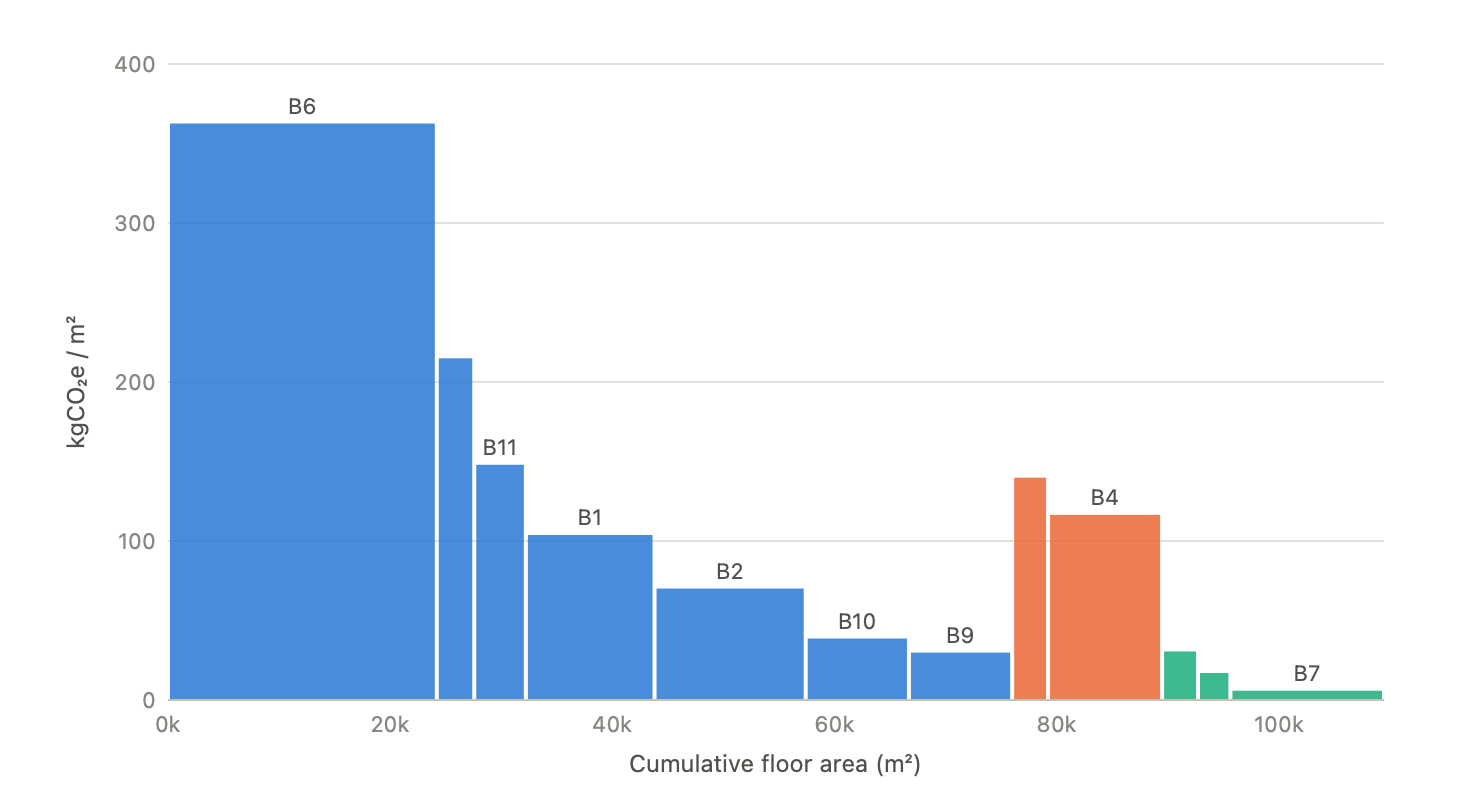
Carbon Signal has tons of useful charts and graphs to visualize data. But sometimes you want to see things broken down in a specific way, or you want to combine different types of data into a unique visualization. For this example, let’s say you want to visualize the emissions intensity (area normalized emissions) of each building, but preserve some indication of absolute emissions, to help you quickly identify large and inefficient buildings.
Prompt
“Plot my buildings with emissions intensity on the vertical axis against cumulative floor area on the horizontal, so each building's rectangle area equals its total emissions. Sort and color the chart by tag.”
Response
4. Downside Risk
Every savings estimate carries a range. While most people look at the median value to sort and rank interventions, you can use other quantile values as well. Sorting and ranking by the 25th percentile, for example, can help answer questions about downside risk: which interventions have the biggest impact, given a more conservative estimate of savings?
Prompt
“Rank interventions across my portfolio by their 25th-percentile emissions savings rather than the central estimate. Which measures move down the list when I do that, and which hold their position?”
Response
”I ranked the eight retrofit measures in your Carbon Signal portfolio twice: once by the central estimate and once by the 25th percentile. For each measure I added up annual emissions savings across all buildings where the model run is complete. That covers 11 buildings for most measures. Equipment and Plug Load Management moves down, falling from 6th to last. Its downside is the widest in the portfolio: the P25 keeps only about a fifth of the central estimate. Two buildings drive this. Building 1 has the biggest single plug-load saving (226 t central), but its P25 is 0. At Building 6 (District Energy Lab), the P25 is negative, meaning the measure could increase emissions there. The top five interventions keep their places. Electrification is the most robust measure by far, keeping 94% of its central value at P25."
5. Audit Priorities
Every model carries confidence flags on its assumptions. Some low-confidence inputs barely move the result; others sit underneath a nine-figure decision. Knowing which is which can help direct in-person audits towards the systems that matter.
Prompt
“Which of my buildings have results resting on low-confidence assumptions, and which single piece of missing data would most reduce uncertainty in my capital plan?”
Response
”The data that matters most is Building 6's real ventilation rate. That means its actual air-change rate and outdoor-air flow, occupied versus setback, taken from BAS trend logs or a recent test-and-balance report. Here is why. The interventions you've applied total about $4.16M in capex. If you add up the width of each measure's savings range, the total spread is about $6.9M. Three Building 6 measures account for 63% of that spread.
- Smarter Ventilation: estimated savings of $1.94M/yr, with a range $1.76M wide.
- Smarter Building Operations: a $1.30M-wide range.
- Fan & Airflow Optimization: a $1.29M-wide range.
All three depend mainly on how much air the lab moves and when. Right now that's modeled with an assumed air change rate and assumed fan power, both low-confidence. One measured number here would narrow more of your plan's range than fixing every other building combined.